Visual timer · iPhone & iPad
Time you can see.
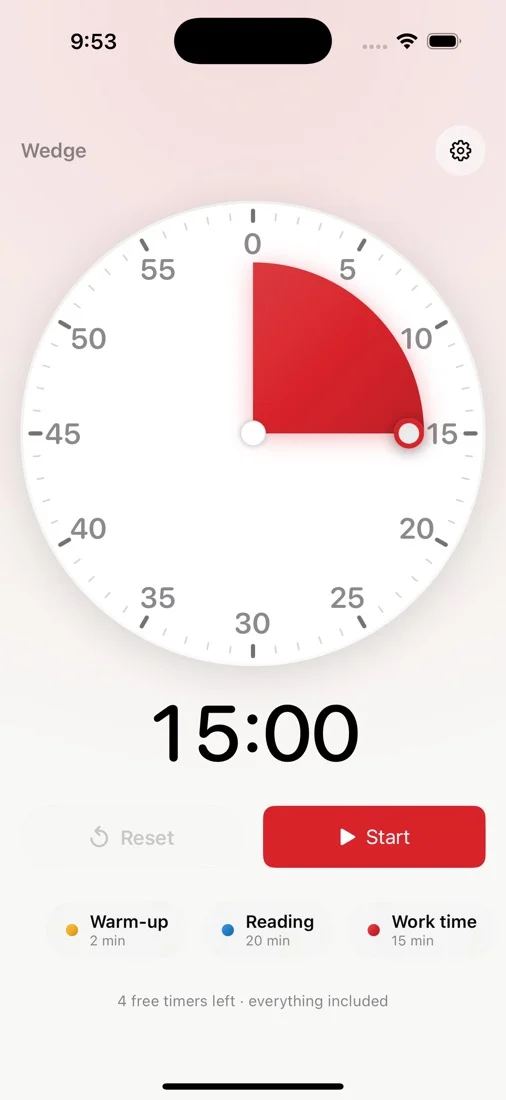
A red wedge shrinks as the minutes run out. Nothing to read, nothing to subtract — you just look at how much is left.

Five full timers free, then $5.99 once. No ads. No subscription. No account.
Advertising
None, ever No ad code in the binary. Nothing for a child to tap by accident.Price
$5.99, once Every future update included. Nothing renews, nothing to cancel.Data collected
Zero No account, no analytics, no server. It never phones home.The idea
A shrinking shape is not abstract. A number is.
“Five more minutes” means nothing to a six year old, and not much more to anyone with time blindness. A red area that is visibly getting smaller means something immediately — which is why visual timers are standard equipment in classrooms and therapy rooms.
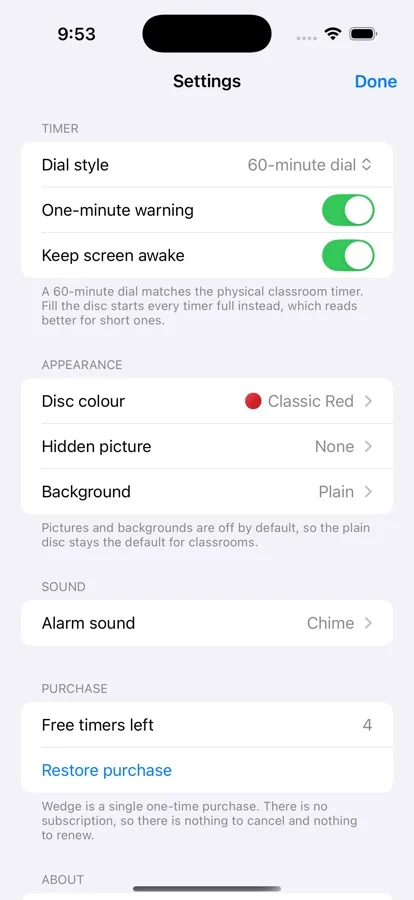
Drag the disc to set a timer or tap a saved preset. Choose a one-hour dial to match the physical classroom timer, or a two-hour dial for quiet time, naps and longer tests.
For younger rooms
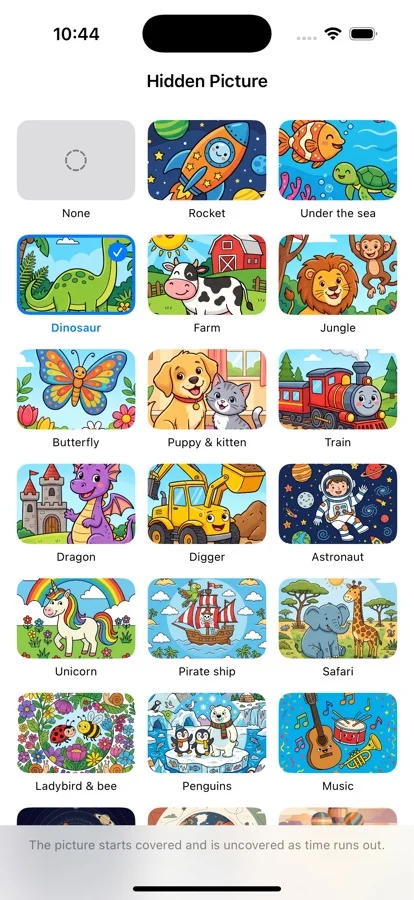
Hide a picture underneath. It appears as the time goes.
Turn on a hidden picture and the disc starts fully covered. As the wedge retreats, the picture underneath is uncovered a slice at a time, finishing exactly when the timer does. A child who will not watch a countdown will watch a dinosaur arrive.
Thirty pictures and thirty backgrounds, and they are not all for small children: the set runs from cartoon dinosaurs through to a mandala, a koi pond and a nebula, so the same reveal works for a teenager or for an adult using this to hold their own focus. Ten alarm sounds too, six of them deliberately soft for sensory-sensitive rooms. Choose Home and kids during setup to start with surprise pictures. Classrooms, clinics and personal focus start with the plain disc. Change pictures and backgrounds in Settings.

4 free timers left · everything included
In the app
Everything unlocked from the first launch.
The free trial is five complete timers with every feature on, not a stripped-back version that nags.
Also included
A Live Activity that keeps the countdown on the Lock Screen and in the Dynamic Island. A kid-lock that freezes the screen mid-session so nobody can stop it. Named, coloured presets, so “Reading 20” is one tap. Siri and Shortcuts. Full VoiceOver support and Dynamic Type — and no state is ever shown by colour alone.
Why this exists
Built to be handed to a child.
The free ones serve ads to children
The most-installed free visual timer runs adverts mid-session, and its reviews are full of teachers describing what appeared on a classroom projector. Wedge Timer has no advertising code in it at all — not disabled, not present.
The good one went subscription
A timer is not a service. It does not need a server, it does not improve monthly, and it should not bill you every year. One purchase, every future update, nothing to cancel.
Nothing leaves the device
No account, no sign-in, no analytics, no crash reporting, no server to talk to. Your presets and settings sit on your device. There is nothing collected about you, and nothing about your child.
Specification
The whole thing, plainly.
- Price
- Free for five complete timers, then $5.99 once. Family Sharing enabled.
- Devices
- iPhone and iPad, portrait and landscape. iOS 18 and later.
- Dial
- Choose a one-hour or two-hour dial, or fill the disc for shorter sessions. Drag to set.
- Timekeeping
- Stores an end time rather than counting down, so backgrounding, sleep or force-quitting cannot make it drift.
- Alarm
- Ten sounds, six gentle. On iOS 26 and later it rings through the silent switch.
- Accessibility
- VoiceOver labels on the dial, full Dynamic Type, reduced-motion honoured, never colour-only state.
- Data collected
- None. No account, no analytics, no third-party SDKs, no server.
Questions
Is it really a one-time purchase?
Yes. $5.99 once, including every future update. There is no subscription to cancel because there is no subscription, and no tier above it to upsell you to.
What do I get before paying?
Five complete timers with every feature turned on — pictures, backgrounds, all ten sounds, presets, kid-lock. Not a crippled version. The app tells you how many are left from the first launch, so the paywall is never a surprise.
Will my child see ads?
No. There is no advertising code in the app. There is also no in-app browser and no external link anywhere on the timer screen, so there is nothing to tap through to.
Does it keep time if I leave the app?
Yes. The timer stores an end time and works out what is left when you come back, rather than counting down in the background. Backgrounding, locking, sleeping or force-quitting cannot make it drift, and the alarm is scheduled with the system rather than needing the app to stay awake.
Can I stop a child stopping the timer?
Start the timer, then tap the padlock. The screen ignores taps until you triple-tap to unlock it.
Something is wrong. Who do I talk to?
A person. Write to support@cognfy.com, or see the support page for the common fixes first.
Try it for five timers.
If it is not better than what you use now, you have spent nothing.